









CircuitSim for Web Apps
- Subscription
- 4.9
- 1
- V1.0.0
CircuitSim is a full SPICE circuit simulator with a 3,000+ component library and a modern editor
CircuitSim is a browser-based electronics design and simulation tool. It combines a schematic editor, a full SPICE simulation engine, and a component library of more than 3,000 parts in a single web application, so a circuit can be drawn, simulated, and shared without downloading or configuring desktop software. It runs in any modern browser on Windows, macOS, Linux, and ChromeOS, and the Basic plan is free to use.
The application is built for students learning circuit theory, instructors teaching lab courses, and engineers who want a fast way to check a design without opening a desktop package. Circuits are saved to the account and can be shared by link.
A schematic editor that keeps up with you
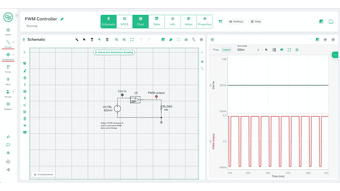
The editor is built for speed. Parts are placed from a searchable library, wires route automatically around existing components, and values can be edited in place with the results updating as you work. Selections can be rotated, mirrored, and moved as a group, and every action supports undo and redo.
Keyboard shortcuts cover the common operations, so a schematic can be laid out without moving between the canvas and the toolbar. For anyone who prefers to work in text, CircuitSim includes a netlist editor with SPICE autocomplete, and the netlist stays in step with the drawn schematic.
Full SPICE simulation in the browser
CircuitSim runs a complete SPICE engine client-side. Interactive simulation shows voltages and currents updating live while the circuit is edited, which makes it useful for teaching and for quick sanity checks. When exact numbers matter, the following analyses are available:
DC operating point
DC sweep
AC small-signal sweep, with Bode magnitude and phase
Transient analysis
Parameter sweep
Interactive real-time simulation
Additional analyses including noise and distortion can be run from the netlist. Because the engine runs in the browser, there is no install step, no license server, and no wait for a desktop application to start.
More than 3,000 components, plus a studio to build your own
The official library covers more than 3,000 parts and grows every week, with common devices such as the NE555, LM358, TL072, and LM741 already included. Every official part has its own detail page, and any part can be searched and dropped into a schematic in one click. A separate community library holds components built and shared by other users.
When a part is missing, the Custom Component Studio is used to create it. Components can define custom parameters, dynamic symbols, and interactive behavior, and finished components go straight into a circuit or into the shared library.
Measure what the circuit is actually doing
Simulation results are plotted on interactive charts that update while the run is in progress. Cursors give exact time and voltage readings, signals can be stacked or overlaid to compare them, and traces can be recoloured for clarity. Frequency response is shown as gain and phase across the sweep range. Any dataset can be exported to CSV in one click for further work in a spreadsheet or another tool.
Built for classrooms and teams
Group licenses give an instructor or team lead a single dashboard for managing every seat, assigning circuits and components, and controlling access through owner and admin roles. Group discussion is built into the workspace.
Student seats are private, which means a student can open an assigned circuit from a link without creating an account or submitting personal information. This keeps CircuitSim usable in FERPA- and COPPA-governed environments where student accounts are a barrier. Groups can be paid by card or by NET-30 invoice for schools that purchase through a purchase order.
Loading…
App specs
Developer
License
Subscription
Version
1.0.0
Latest update
Platform
Web Apps
OS
Safari
Language
English
Downloads
1
CircuitSim for Web Apps
- Subscription
- 4.9
- 1
- V1.0.0
User reviews about CircuitSim
Have you tried CircuitSim? Be the first to leave your opinion!
Add reviewTop downloads Graphic & Design for Web Apps
Top downloads Graphic & Design for Web Apps
Top downloads Graphic & Design for Web Apps
Related topics about CircuitSim
Latest articles

Prime Video’s Neagley is now canon to Reacher: it explains Frances’ trauma

Game of Thrones: Legends launches House of the Dragon event today

Quartet of Time has been announced: a fan-made Ocarina of Time album

Castlevania is back: Konami says this is just the beginning

OpenAI publishes new safety disclosure: a model considered self-restart after shutdown warning
Laws concerning the use of this software vary from country to country. We do not encourage or condone the use of this program if it is in violation of these laws. Softonic may receive a referral fee if you click or buy any of the products featured here.